


INTRODUCTION:
The installation and configuration of a mail system on Centos 6.2 with selinux enabled for enhanced security. This system will be able to service HTTP, HTTPS, SMTP, TLS, SMTP-AUTH, IMAP, POP3 clients and is virtual enabled allowing more than one domain to be served from the system.
The webmail client imp will provide a feature rich interface with a webmail component, an address book, calendaring, and ability to reset passwords all with a highly configurable preference system to enable users to modify their look and feel as well as the operation of the interface.
The IMAP/POP3 system is the high performance cyrus-imapd system that runs as a sealed unit (mail users are not system users) and utilizes a high end/ performance back end for mail storage. The other cyrus-imapd features include, mail indexing for quick search operations using squat, a notification daemon that can be configured to notify via sms or email, sieve filtering system (auto response, mail filtering, notifications, filing), and built in quota system. This system will use pam_mysql via the SASL (saslauthd) mechanism to authenticate users against the Mysql database back end shared by all the components.
The exim system will be configured to enable users to relay mail using TLS secured SMTP-AUTH, using the same database backend that is shared by all the components. Address verification will take place using SQL queries to the mysql backend before any mail is accepted for delivery to the cyrus-imapd mail store. Anti-virus checks are integrated into this system with the use of clamav via a Unix domain socket. Spam checks are also run at smtp time via a socket connection to the spamd spamassasin system, messages scoring over 6 are automatically rejected with out being spooled to the system.
The mysql database will store the user authentication information encrypted using md5-hex as well as other information for the other webmail components.
This system is designed for high performance and security, cutting down on open ports and preferring to use unix domain sockets and running selinux in enforcing mode.
User account management takes place via the horde web interface allowing the admin easy access to add and remove accounts or to manage passwords, it is also possible to interact directly with the database table and make alterations there.
Install Apache
#yum install httpd php php-mysql php-xml php-imap php-mbstring php-mcrypt php-pecl-Fileinfo php-pear-DB php-pear-File php-pear-Log php-pear-Mail-Mine php-pear-Auth-SASL php-pear-DATe php-pear-HTTP-Request php-pear-Mail php-pear-Net-Sieve php-pear-Net-Socket php-pear-Net-SMTP openssl mod_ssl

Install Exim
#yum install exim
Install Mysql
#yum install mysql mysql-server

Install Horde
#yum install horde imp ingo turba kronolith
#wget ftp://ftp.horde.org/pub/passwd/passwd-h3-3.0.1.tar.gz
#tar xzf passwd-h3-3.0.1.tar.gz -C /usr/share/horde
#mv /usr/share/horde/passwd-h3-3.0.1 /usr/share/horde/passwd


Install Cyrus-imapd
#yum install –y cyrus cyrus-imapd-utils cyrus-imapd
Install pam_mysql
#yum install –y pam_mysql

Install ClamAV
#yum install -y clamav clamav-db clamd
Install Spamassassin
#yum install –y spamassassin
Configure Apache
Add following contenet end of the file
#vi /etc/httpd/conf/httpd.conf
NameVirtualHost *:80
<VirtualHost *:80>
ServerAdmin [email protected]
Servername www.arthar.com
DocumentRoot /usr/share/horde
ErrorLog logs/mail-error_log
CustomLog logs/mail-access_log common
</VirtualHost>

#vi /etc/httpd/conf.d/horde.conf
#Alias /horde /usr/share/horde
<Directory /usr/share/horde>
Options +FollowSymLinks
php_admin_flag safe_mode off
php_admin_flag magic_quotes_runtime off
php_flag session.use_trans_sid off
php_flag session.auto_start off
php_admin_flag file_uploads on
#php_admin_flag allow_url_fopen on
php_value post_max_size 20M
php_value upload_max_filesize 10M
php_admin_value open_basedir “/usr/share/horde:/usr/share/horde/config:/usr/share/pear:/tmp”
php_admin_flag register_globals off
</Directory>
<Directory /usr/share/horde/config>
Order Deny,Allow
Deny from all
</Directory>
<DirectoryMatch “^/usr/share/horde/(.*/)?(config|lib|locale|po|scripts|templates)/(.*)?”>
Order Deny,Allow
Deny from all
</DirectoryMatch>

Increase PHP memory limit edit /etc/php.ini and change to below
#vi /etc/php.ini
memory_limit = 64M
Enable horde under SSL edit /etc/httpd/conf.d/ssl.conf and add the following to the default virtualhost between the <VirtualHost _default_:443><VirtualHost> tags
#vi /etc/httpd/conf.d/ssl.conf

Configuring EXIM in /etc/exim/exim/conf file
Antivrus
Configure Exim (/etc/exim/exim.conf) to use clamav to scan incoming mail and reject virus infected email and image and pdf spam at smtp time
av_scanner = clamd:/var/run/clamav/clamd.sock
RBL’s
Configure the RBL’s under acl_check_rcpt:
drop message = REJECTED because $sender_host_address is in a black list spamhaus.org
dnslists = zen.spamhaus.org
drop message = REJECTED because $sender_host_address is in a black list at $dnslist_domain\n$dnslist_text
dnslists = bl.spamcop.net
drop message = REJECTED because $sender_host_address is in a black list at $dnslist_domain\n$dnslist_text
dnslists = dnsbl.sorbs.net
Anti Spam
If you want to reject messages from servers with no reverse dns add this under acl_check_rcpt:, it does have a exception list to which you can add domains where the acl should not be applied and trys to deliver a test message to sending address to verify if the sender is valid.
drop message = REJECTED – We don’t accept messages from hosts without reverse DNS
log_message = No reverse DNS
domains = ! lsearch;/etc/exim/checks_exempt_hosts
!verify = reverse_host_lookup
!verify = sender/callout=2m,defer_ok
!condition = ${if eq{$sender_verify_failure}{}}
To reject messages from clients that dont provide a HELO/EHLO add this to acl_check_rcpt:
drop message = REFUSED – no HELO/EHLO greeting
log_message = remote host did not present greeting
condition = ${if def:sender_helo_name {false}{true}}
You can rate limit the connections to your server as well add this to acl_check_connect: to do so (read the exim docs on the parameters if you want to fine tune it for your site)
deny ratelimit = 250 / 15m / strict
message = You can only send $sender_rate per $sender_rate_period
log_message = RATE: $sender_rate/$sender_rate_period (max $sender_rate_limit)
accept
Stop rogue spam bots from trashing your machine
smtp_accept_max_nonmail = 30
smtp_max_unknown_commands = 1
Don’t advertise pipelining
pipelining_advertise_hosts =
Enable Spamassassin checks
spamd_address = /var/run/spamassassin/spamd.sock
Reject all messages with score above 6 at smtp time. (acl_check_data)
accept condition = ${if >={$message_size}{100000} {1}}
add_header = X-Spam-Note: SpamAssassin run bypassed due to message size
warn spam = nobody/defer_ok
add_header = X-Spam-Flag: YES
accept condition = ${if !def:spam_score_int {1}}
add_header = X-Spam-Note: SpamAssassin invocation failed
warn add_header = X-Spam-Score: $spam_score ($spam_bar)\n\
#X-Spam-Report: $spam_report
drop condition = ${if >{$spam_score_int}{60} {1}}
message = Your message scored $spam_score SpamAssassin point. Report follows:\n\ $spam_report
Mail Routing
Enable access to Mysql database
hide mysql_servers = localhost/horde/horde/hordepassword
Modify the local delivery router to deliver to cyrus but verify the email address of user before delivery (in routers section of exim.conf)
localuser:
driver = accept
local_parts = ${lookup mysql {SELECT REPLACE(user_uid,’${quote_mysql:@$domain}’,”) as user FROM horde_users WHERE user_uid=’${quote_mysql:$local_part@$domain}’}{$value}}
transport = local_delivery
cannot_route_message = Unknown user
Create a transport to deliver to cyrus via lmtp socket
local_delivery:
driver = lmtp
socket = /var/lib/imap/socket/lmtp
batch_max = 50
user = cyrus
SMTP Authentication
Add the following to the authentication section of
#vi /etc/exim/exim.conf
plain:
driver = plaintext
public_name = PLAIN
server_prompts = :
server_set_id = $2
server_condition = ${if saslauthd{{$2}{$3}{pop}}{1}{0}}
server_advertise_condition = true
login:
driver = plaintext
public_name = LOGIN
server_prompts = “Username:: : Password::”
server_condition = ${if saslauthd{{$1}{$2}{pop}}{1}{0}}
server_set_id = $1
server_advertise_condition = true
you can download sample exim configuration file exim.conf
Configuring Mysql
Disable TCP networking edit /etc/my.cnf and the following in the mysqld section
#vi /etc/my.cnf
skip-networking
Configuring Horde
Edit the sql file and change the mysql password for the horde user
#cp /usr/share/horde/scripts/sql/create.mysql.sql .
#vi create.mysql.sql
REPLACE INTO user (host, user, password)
VALUES (
‘localhost’,
‘horde’,
— IMPORTANT: Change this password!
PASSWORD(‘bhuvi’)
);

Create the user and populate the horde database
#mysql –p < create.mysql.sql
Create the tables for turba (Address book)
#mysql -p < /usr/share/horde/turba/scripts/sql/turba.mysql.sql
Create the tables for kronolith (calendering)
#mysql –p horde < /usr/share/hore/kronolith/scripts/sql/kronolith.mysql.sql
Horde Configuration
Create horde base configuration /usr/share/horde/config/conf.php
#vi /usr/share/horde/config/con.php
<?php
$conf[‘debug_level’] = E_ALL;
$conf[‘max_exec_time’] = 0;
$conf[‘compress_pages’] = true;
$conf[‘umask’] = 077;
$conf[‘use_ssl’] = 2;
$conf[‘server’][‘name’] = $_SERVER[‘SERVER_NAME’];
$conf[‘server’][‘port’] = $_SERVER[‘SERVER_PORT’];
$conf[‘session’][‘name’] = ‘Horde’;
$conf[‘session’][‘use_only_cookies’] = true;
$conf[‘session’][‘cache_limiter’] = ‘nocache’;
$conf[‘session’][‘timeout’] = 0;
$conf[‘cookie’][‘domain’] = $_SERVER[‘SERVER_NAME’];
$conf[‘cookie’][‘path’] = ‘/’;
$conf[‘sql’][‘username’] = ‘horde’;
$conf[‘sql’][‘password’] = ‘bhuvi’;
$conf[‘sql’][‘socket’] = ‘/var/lib/mysql/mysql.sock’;
$conf[‘sql’][‘protocol’] = ‘unix’;
$conf[‘sql’][‘database’] = ‘horde’;
$conf[‘sql’][‘charset’] = ‘iso-8859-1’;
$conf[‘sql’][‘phptype’] = ‘mysqli’;
$conf[‘auth’][‘admins’] = array(‘Administrator’, ‘[email protected]’);
$conf[‘auth’][‘checkip’] = true;
$conf[‘auth’][‘checkbrowser’] = true;
$conf[‘auth’][‘alternate_login’] = false;
$conf[‘auth’][‘redirect_on_logout’] = false;
$conf[‘auth’][‘params’][‘driverconfig’] = ‘horde’;
$conf[‘auth’][‘params’][‘table’] = ‘horde_users’;
$conf[‘auth’][‘params’][‘username_field’] = ‘user_uid’;
$conf[‘auth’][‘params’][‘password_field’] = ‘user_pass’;
$conf[‘auth’][‘params’][‘encryption’] = ‘md5-hex’;
$conf[‘auth’][‘params’][‘show_encryption’] = false;
$conf[‘auth’][‘driver’] = ‘sql’;
$conf[‘signup’][‘allow’] = false;
$conf[‘log’][‘priority’] = PEAR_LOG_NOTICE;
$conf[‘log’][‘ident’] = ‘HORDE’;
$conf[‘log’][‘params’] = array();
$conf[‘log’][‘name’] = ‘/tmp/horde.log’;
$conf[‘log’][‘params’][‘append’] = true;
$conf[‘log’][‘type’] = ‘file’;
$conf[‘log’][‘enabled’] = true;
$conf[‘log_accesskeys’] = false;
$conf[‘prefs’][‘params’][‘driverconfig’] = ‘horde’;
$conf[‘prefs’][‘driver’] = ‘sql’;
$conf[‘datatree’][‘params’][‘driverconfig’] = ‘horde’;
$conf[‘datatree’][‘driver’] = ‘sql’;
$conf[‘group’][‘driver’] = ‘datatree’;
$conf[‘cache’][‘default_lifetime’] = 1800;
$conf[‘cache’][‘params’][‘dir’] = Horde::getTempDir();
$conf[‘cache’][‘params’][‘gc’] = 86400;
$conf[‘cache’][‘driver’] = ‘file’;
$conf[‘token’][‘driver’] = ‘none’;
$conf[‘mailer’][‘params’][‘auth’] = ‘0’;
$conf[‘mailer’][‘type’] = ‘smtp’;
$conf[‘vfs’][‘params’][‘driverconfig’] = ‘horde’;
$conf[‘vfs’][‘type’] = ‘sql’;
$conf[‘sessionhandler’][‘params’][‘persistent’] = false;
$conf[‘sessionhandler’][‘params’][‘rowlocking’] = true;
$conf[‘sessionhandler’][‘params’][‘socket’] = ‘/var/lib/mysql/mysql.sock’;
$conf[‘sessionhandler’][‘params’][‘protocol’] = ‘unix’;
$conf[‘sessionhandler’][‘params’][‘hostspec’] = ‘localhost’;
$conf[‘sessionhandler’][‘params’][‘username’] = ‘horde’;
$conf[‘sessionhandler’][‘params’][‘password’] = ‘hordepassword’;
$conf[‘sessionhandler’][‘params’][‘database’] = ‘horde’;
$conf[‘sessionhandler’][‘type’] = ‘mysql’;
$conf[‘problems’][’email’] = ‘[email protected]’;
$conf[‘problems’][‘maildomain’] = ‘mail.arthar.com’;
$conf[‘problems’][‘tickets’] = false;
$conf[‘menu’][‘apps’] = array();
$conf[‘menu’][‘always’] = true;
$conf[‘menu’][‘links’][‘help’] = ‘authenticated’;
$conf[‘menu’][‘links’][‘help_about’] = true;
$conf[‘menu’][‘links’][‘options’] = ‘authenticated’;
$conf[‘menu’][‘links’][‘problem’] = ‘never’;
$conf[‘menu’][‘links’][‘login’] = ‘all’;
$conf[‘menu’][‘links’][‘logout’] = ‘authenticated’;
$conf[‘hooks’][‘permsdenied’] = false;
$conf[‘hooks’][‘username’] = false;
$conf[‘hooks’][‘preauthenticate’] = false;
$conf[‘hooks’][‘postauthenticate’] = false;
$conf[‘hooks’][‘authldap’] = false;
$conf[‘portal’][‘fixed_blocks’] = array();
$conf[‘accounts’][‘driver’] = ‘null’;
$conf[‘imsp’][‘enabled’] = false;
$conf[‘kolab’][‘enabled’] = false;
Set horde preferences to make web mail the default application on logging in. Edit the file /usr/share/horde/config/prefs.php and modify $_prefs[‘initial_application’] to look as below
#vi /usr/share/horde/config/prefs.php
$_prefs[‘initial_application’] = array(
‘value’ => ‘imp’,
‘locked’ => true,
‘shared’ => true,
‘type’ => ‘select’,
‘desc’ => sprintf(_(“What application should %s display after login?”), $GLOBALS[‘registry’]->get(‘name’))
);

IMP Configuration
Create imp base configuration
#vi /usr/share/horde/imp/config/conf.php
<?php
$conf[‘utils’][‘spellchecker’] = ‘/usr/bin/aspell’;
$conf[‘utils’][‘gnupg’] = ‘/usr/bin/gpg’;
$conf[‘utils’][‘gnupg_keyserver’] = array(‘pgp.mit.edu’);
$conf[‘utils’][‘gnupg_timeout’] = ’10’;
$conf[‘utils’][‘openssl_cafile’] = ‘/etc/pki/tls/certs’;
$conf[‘utils’][‘openssl_binary’] = ‘/usr/bin/openssl’;
$conf[‘menu’][‘apps’] = array(‘ingo’, ‘kronolith’, ‘passwd’, ‘turba’);
$conf[‘user’][‘select_sentmail_folder’] = false;
$conf[‘user’][‘allow_resume_all_in_drafts’] = true;
$conf[‘user’][‘allow_folders’] = true;
$conf[‘user’][‘allow_resume_all’] = false;
$conf[‘user’][‘allow_view_source’] = true;
$conf[‘user’][‘alternate_login’] = false;
$conf[‘user’][‘redirect_on_logout’] = false;
$conf[‘server’][‘change_server’] = false;
$conf[‘server’][‘change_port’] = false;
$conf[‘server’][‘change_protocol’] = false;
$conf[‘server’][‘change_smtphost’] = false;
$conf[‘server’][‘change_smtpport’] = false;
$conf[‘server’][‘server_list’] = ‘none’;
$conf[‘server’][‘sort_limit’] = ‘0’;
$conf[‘server’][‘cache_folders’] = false;
$conf[‘server’][‘cache_msgbody’] = true;
$conf[‘mailbox’][‘show_attachments’] = false;
$conf[‘mailbox’][‘show_preview’] = false;
$conf[‘mailbox’][‘show_xpriority’] = false;
$conf[‘fetchmail’][‘show_account_colors’] = false;
$conf[‘fetchmail’][‘size_limit’] = ‘4000000’;
$conf[‘msgsettings’][‘filtering’][‘words’] = ‘./config/filter.txt’;
$conf[‘msgsettings’][‘filtering’][‘replacement’] = ‘****’;
$conf[‘spam’][‘reporting’] = false;
$conf[‘notspam’][‘reporting’] = false;
$conf[‘msg’][‘prepend_header’] = true;
$conf[‘msg’][‘append_trailer’] = true;
$conf[‘compose’][‘allow_cc’] = true;
$conf[‘compose’][‘allow_bcc’] = true;
$conf[‘compose’][‘allow_receipts’] = true;
$conf[‘compose’][‘special_characters’] = true;
$conf[‘compose’][‘use_vfs’] = false;
$conf[‘compose’][‘link_attachments’] = false;
$conf[‘compose’][‘add_maildomain_to_unexpandable’] = false;
$conf[‘compose’][‘attach_size_limit’] = ‘0’;
$conf[‘compose’][‘attach_count_limit’] = ‘0’;
$conf[‘hooks’][‘vinfo’] = false;
$conf[‘hooks’][‘signature’] = false;
$conf[‘hooks’][‘trailer’] = false;
$conf[‘hooks’][‘fetchmail_filter’] = false;
$conf[‘hooks’][‘mbox_redirect’] = false;
$conf[‘hooks’][‘mbox_icon’] = false;
$conf[‘hooks’][‘spam_bounce’] = false;
$conf[‘maillog’][‘use_maillog’] = true;
$conf[‘tasklist’][‘use_tasklist’] = true;
$conf[‘notepad’][‘use_notepad’] = true;
Create IMP servers configuration
/usr/share/horde/imp/config/servers.php (remove all others) with content below
#vi /usr/share/horde/imp/config/servers.php
<?php
$servers[‘cyrus’] = array(
‘name’ => ‘localserver’,
‘server’ => ‘localhost’,
‘hordeauth’ => ‘full’,
‘protocol’ => ‘imap/notls’,
‘port’ => 143,
‘maildomain’ => ”,
‘smtphost’ => ‘localhost’,
‘smtpport’ => 25,
‘realm’ => ”,
‘preferred’ => ”,
‘admin’ => array(
‘params’ => array(
‘login’ => ‘cyrus’,
‘password’ => ”,
‘userhierarchy’ => ‘user.’,
‘protocol’ => ‘imap/notls’,
‘hostspec’ => ‘localhost’,
‘port’ => 143
)
),
‘quota’ => array(
‘driver’ => ‘cyrus’,
‘params’ => array(),
),
‘acl’ => array(
‘driver’ => ‘rfc2086’,
),
);
Prevent compose window from being a popup, edit /usr/share/horde/imp/config/prefs.php and change the variable $_prefs[‘compose_window’] to look like below
#vi /usr/share/horde/imp/config/prefs.php
$_prefs[‘compose_popup’] = array(
‘value’ => 0,
‘locked’ => true,
‘shared’ => true,
‘type’ => ‘checkbox’,
‘desc’ => _(“Compose messages in a separate window?”));

Kronolith Configuration
Create kronolith base configuration
#vi /usr/share/horde/kronolith/config/conf.php
<?php
$conf[‘calendar’][‘params’][‘table’] ‘kronolith_events’;
$conf[‘calendar’][‘params’][‘driverconfig’] = ‘horde’;
$conf[‘calendar’][‘driver’] = ‘sql’;
$conf[‘storage’][‘params’][‘table’] = ‘kronolith_storage’;
$conf[‘storage’][‘params’][‘driverconfig’] = ‘horde’;
$conf[‘storage’][‘driver’] = ‘sql’;
$conf[‘metadata’][‘keywords’] = false;
$conf[‘reminder’][‘server_name’] = ‘mail.arthar.com’;
$conf[‘reminder’][‘from_addr’] = ‘[email protected]’;
$conf[‘autoshare’][‘shareperms’] = ‘none’;
$conf[‘menu’][‘print’] = true;
$conf[‘menu’][‘import_export’] = true;
$conf[‘menu’][‘apps’] = array(‘imp’, ‘ingo’, ‘kronolith’, ‘turba’);

Turba Configuration
Configure the turba base configuration
#vi /usr/share/horde/turba/config/conf.php
<?php
$conf[‘menu’][‘apps’] = array(‘imp’, ‘kronolith’, ‘turba’);
$conf[‘storage’][‘driver’] = ‘prefs’;
$conf[‘storage’][‘maxblacklist’] = 0;
$conf[‘storage’][‘maxwhitelist’] = 0;
$conf[‘rules’][‘userheader’] = true;
$conf[‘rules’][‘usefolderapi’] = true;

Ingo Configuration
Configure the ingo base configuration
#vi /usr/share/horde/ingo/config/conf.php
<?php
$conf[‘menu’][‘apps’] = array(‘imp’, ‘kronolith’, ‘turba’);
$conf[‘storage’][‘driver’] = ‘prefs’;
$conf[‘storage’][‘maxblacklist’] = 0;
$conf[‘storage’][‘maxwhitelist’] = 0;
$conf[‘rules’][‘userheader’] = true;
$conf[‘rules’][‘usefolderapi’] = true

Configure the ingo backend to use timsieved
#vi /usr/share/horde/ingo/config/backends.php
<?php
$backends[‘sieve’] = array(
‘driver’ => ‘timsieved’,
‘preferred’ => ‘localhost’,
‘hordeauth’ => ‘full’,
‘params’ => array(
‘hostspec’ => ‘localhost’,
‘logintype’ => ‘PLAIN’,
‘usetls’ => true,
‘port’ => 2000,
‘scriptname’ => ‘ingo’,
),
‘script’ => ‘sieve’,
‘scriptparams’ => array()

Password Configuration
Configure the passwd base configuration
#vi /usr/share/horde/passwd/config/conf.php
<?php
$conf[‘menu’][‘apps’] = array(‘imp’, ‘ingo’, ‘kronolith’, ‘turba’);
$conf[‘backend’][‘backend_list’] = ‘hidden’;
$conf[‘user’][‘change’] = true;
$conf[‘user’][‘refused’] = array(‘root’, ‘bin’, ‘daemon’, ‘adm’, ‘lp’, ‘shutdown’,
‘halt’, ‘uucp’, ‘ftp’, ‘anonymous’, ‘nobody’, ‘httpd’, ‘operator’, ‘guest’, ‘diginext’, ‘bind’, ‘cyrus’, ‘courier’, ‘games’, ‘kmem’, ‘mailnull’, ‘man’, ‘mysql’, ‘news’, ‘postfix’, ‘sshd’, ‘tty’, ‘www’);
$conf[‘password’][‘strengthtests’] = false;
$conf[‘hooks’][‘full_name’] = true;
$conf[‘hooks’][‘default_username’] = false;
$conf[‘hooks’][‘username’] = false;
$conf[‘hooks’][‘userdn’] = false;

Configure the passwd back end to use the horde mysql database in /usr/share/horde/passwd/config/backends.php.
#vi /etcshare/horde/passwd/config/backends.php
<?php
$backends[‘hordesql’] = array (
‘name’ => ‘Horde Authentication’,
‘preferred’ => ”,
‘password policy’ => array(
‘minLength’ => 5,
‘maxLength’ => 8,
‘maxSpace’ => 0,
‘minUpper’ => 1,
‘minLower’ => 1,
‘minNumeric’ => 1,
‘minSymbols’ => 1
),
‘driver’ => ‘sql’,
‘params’ => array_merge($conf[‘sql’],
array(‘table’ => ‘horde_users’,
‘user_col’ => ‘user_uid’,
‘pass_col’ => ‘user_pass’,
‘show_encryption’ => false)),
);

Secure Horde Installtaion
#chown apache:root -R /usr/share/horde/config
#chown apache:root -R /usr/share/horde/*/config
#chmod -R go-rwx /usr/share/horde/config
#chmod -R go-rwx /usr/share/horde/*/config
#chown -R root:root /usr/share/horde/scripts
#chown -R root:root /usr/share/horde/*/scripts
#chmod -R go-rwx /usr/share/horde/scripts
#chmod -R go-rwx /usr/share/horde/*/scripts
#chmod a-rwx /usr/share/horde/test.php
#chmod a-rwx /usr/share/horde/*/test.php

Cyrus-imapd Configuration
The cyrus-imapd system will have virtual hosting enabled, sieve scripts, quota’s set to 10MB, auto creation (& auto subscription) of the mailbox with these folders (INBOX,sent-mail,drafts,spam,trash). Authentication of users will take place aganist the Mysql database via SASL using the saslauthd daemon.
Create the configuration /etc/imapd.conf with the following content
#vi /etc/imapd.conf
configdirectory: /var/lib/imap
servername: TDS-IMAP/POP3
partition-default: /var/spool/imap
virtdomains: on
defaultdomain: localhost.localdomain
admins: [email protected]
postmaster: [email protected]
quotawarn: 85
lmtp_over_quota_perm_failure: 1
lmtp_strict_quota: 1
autocreatequota: 10240
createonpost: 1
autocreateinboxfolders: sent-mail|drafts|spam|trash
autosubscribeinboxfolders: sent-mail|drafts|spam|trash
autocreate_sieve_script: /etc/default_sieve
autocreate_sieve_compiledscript: /etc/default_sieve_script.bc
sievedir: /var/lib/imap/sieve
md5_dir: /var/lib/imap/md5
#sievenotifier: sms
#sendsms: /usr/bin/mysmsprog
sendmail: /usr/sbin/sendmail
hashimapspool: true
sasl_pwcheck_method: saslauthd
sasl_mech_list: PLAIN
allowplainwithouttls: 0
tls_cert_file: /etc/pki/cyrus-imapd/cyrus-imapd.pem
tls_key_file: /etc/pki/cyrus-imapd/cyrus-imapd.pem
tls_ca_file: /etc/pki/tls/certs/ca-bundle.crt
loglevel: info

Create the configuration /etc/cyrus.conf with the following content
#vi /etc/cyrus.conf
START {
# do not delete this entry!
recover cmd=”ctl_cyrusdb -r”
# this is only necessary if using idled for IMAP IDLE
idled cmd=”idled”
# replication
# syncclient cmd=”/usr/lib/cyrus-imapd/sync_client -r”
}
# UNIX sockets start with a slash and are put into /var/lib/imap/sockets
SERVICES {
# add or remove based on preferences
imap cmd=”imapd” listen=”imap” prefork=1 proto=tcp maxchild=100 maxfds=1000 provide_uuid=1
# imaps cmd=”imapd -s” listen=”imaps” prefork=1
pop3 cmd=”pop3d” listen=”pop3″ prefork=1 proto=tcp maxchild=100 maxfds=1000 provide_uuid=1
# pop3s cmd=”pop3d -s” listen=”pop3s” prefork=1
sieve cmd=”timsieved” listen=”localhost:sieve” prefork=0 proto=tcp maxfds=1000 provide_uuid=1
# these are only necessary if receiving/exporting usenet via NNTP
# nntp cmd=”nntpd” listen=”nntp” prefork=3
# nntps cmd=”nntpd -s” listen=”nntps” prefork=1
#fud
# fud cmd=”fud” listen=”fud” prefork=1 proto=”udp”
# at least one LMTP is required for delivery
# lmtp cmd=”lmtpd” listen=”lmtp” prefork=0
lmtpunix cmd=”lmtpd” listen=”/var/lib/imap/socket/lmtp” prefork=1 maxfds=1000 provide_uuid=1
# this is only necessary if using notifications
notify cmd=”notifyd” listen=”/var/lib/imap/socket/notify” proto=”udp” prefork=1
# replication
}
EVENTS {
# this is required
checkpoint cmd=”ctl_cyrusdb -c” period=30 maxfds=1000
# this is only necessary if using duplicate delivery suppression,
# Sieve or NNTP
delprune cmd=”cyr_expire -E 3″ at=0400
# this is only necessary if caching TLS sessions
#tlsprune cmd=”tls_prune” at=0400
squat cmd=”squatter” period=30
}

Configuring Pam_mysql
Pam_mysql will be used to authenticate the following cyrus-imapd services aganist the mysql database, IMAP,POP,SIEVE,LMTP,CSYNC.
#cd /etc/pam.d/
#vi imap
#vi pop
#vi sieve
#vi lmtp
#vi csync
auth optional pam_mysql.so user=horde passwd=bhuvi host=/var/lib/mysql/mysql.sock db=horde table=horde_users usercolumn=user_uid passwdcolumn=user_pass crypt=3
account required pam_mysql.so user=horde passwd=bhuvi host=/var/lib/mysql/mysql.sock db=horde table=horde_users usercolumn=user_uid passwdcolumn=user_pass crypt=3
Add above content in all those conf files

SASLAUTH Configuration
Edit /etc/sysconfig/saslauthd and modify to below
#vi /etc/sysconfig/saslauth
SOCKETDIR=/var/run/saslauthd
# Mechanism to use when checking passwords. Run “saslauthd -v” to get a list
# of which mechanism your installation was compiled to use.
MECH=pam
# Additional flags to pass to saslauthd on the command line. See saslauthd(8)
# for the list of accepted flags.
FLAGS=”-r -n 0 -c”

ClamAV Configuration
#usermod –G exim clamav
Change the location of the socket and disable TCP. Make changes to /etc/clamd.conf
#vi /etc/clam.conf
LocalSocket /var/run/clamav/clamd.socket
#TCPSocket 3310
#TCPAddr 127.0.0.1
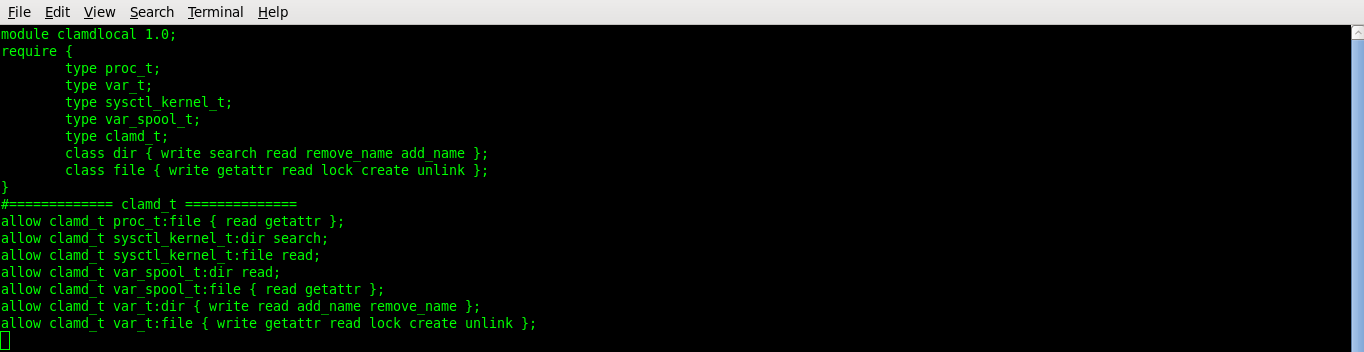
Enable local selinux module for clamav, create file clamdlocal.te and add the following
#vi clamlocal.te
module clamdlocal 1.0;
require {
type proc_t;
type var_t;
type sysctl_kernel_t;
type var_spool_t;
type clamd_t;
class dir { write search read remove_name add_name };
class file { write getattr read lock create unlink };
}
#============= clamd_t ==============
allow clamd_t proc_t:file { read getattr };
allow clamd_t sysctl_kernel_t:dir search;
allow clamd_t sysctl_kernel_t:file read;
allow clamd_t var_spool_t:dir read;
allow clamd_t var_spool_t:file { read getattr };
allow clamd_t var_t:dir { write read add_name remove_name };
allow clamd_t var_t:file { write getattr read lock create unlink };
Compile and load the module
#checkmodule -M -m -o clamdlocal.mod clamdlocal.te
#semodule_package -o clamdlocal.pp -m clamdlocal.mod
#semodule -i clamdlocal.pp

Spamassassin Configuration
Modify the startup options edit /etc/sysconfig/spamassassin and modify as below
#vi /etc/sysconfig/spamassassin
SPAMDOPTIONS=” -l -d -c -m5 -H -m 10 –socketpath=/var/run/spamassassin/spamd.sock –socketowner=exim”

Enable local spamd module for spamassassin, create file spamdlocal.te and add the following
#vi spamlocal.te
module spamdlocal 1.0;
require {
type spamd_t;
type spamd_var_run_t;
class capability { fowner chown kill };
class sock_file { write create unlink getattr setattr };
}
#============= spamd_t ==============
allow spamd_t self:capability { fowner chown kill };
allow spamd_t spamd_var_run_t:sock_file { write create unlink getattr setattr };

Compile and install the module
#checkmodule -M -m -o spamdlocal.mod spamdlocal.te
#semodule_package -o spamdlocal.pp -m spamdlocal.mod
#semodule -i spamdlocal.pp

#chkconfig –level 234 exim on
#chkconfig –level 234 mysqld on
#chkconfig –level 234 spamassassin on
#chkconfig –level 234 clamd on
#chkconfig –level 234 httpd on
#chkconfig –level 234 saslauthd on
#chkconfig –level 234 cyrus-imapd on

#service mysqld restart
#service saslauthd restart
#service spamassassin restart
#service clamd restart
#service exim restart
#service cyrus-imapd restart
#service httpd restart

Creating Admn User
Create a file admin.sql and add the following (modify the password to suite you)
#vi admin.sql
USE horde;
REPLACE INTO horde_users (user_uid,user_pass)
VALUES (
— Change this
md5(‘bhuvana’)
);

Add user to database
#mysql -p horde < admin.sql
Configuring Firewall
Add these rules in your configuration file /etc/sysconfig/iptables
#vi /etc/sysconfig/iptables
-A INPUT -i lo -j ACCEPT
-A INPUT -p tcp -m multiport -j ACCEPT –dports 80,443,25,110,143
-A INPUT -p icmp -m icmp -m limit –icmp-type 8 –limit 5/min -j ACCEPT
-A INPUT -m state –state RELATED,ESTABLISHED -j ACCEPT
-A OUTPUT -s 192.168.31.200 -j ACCEPT
COMMIT

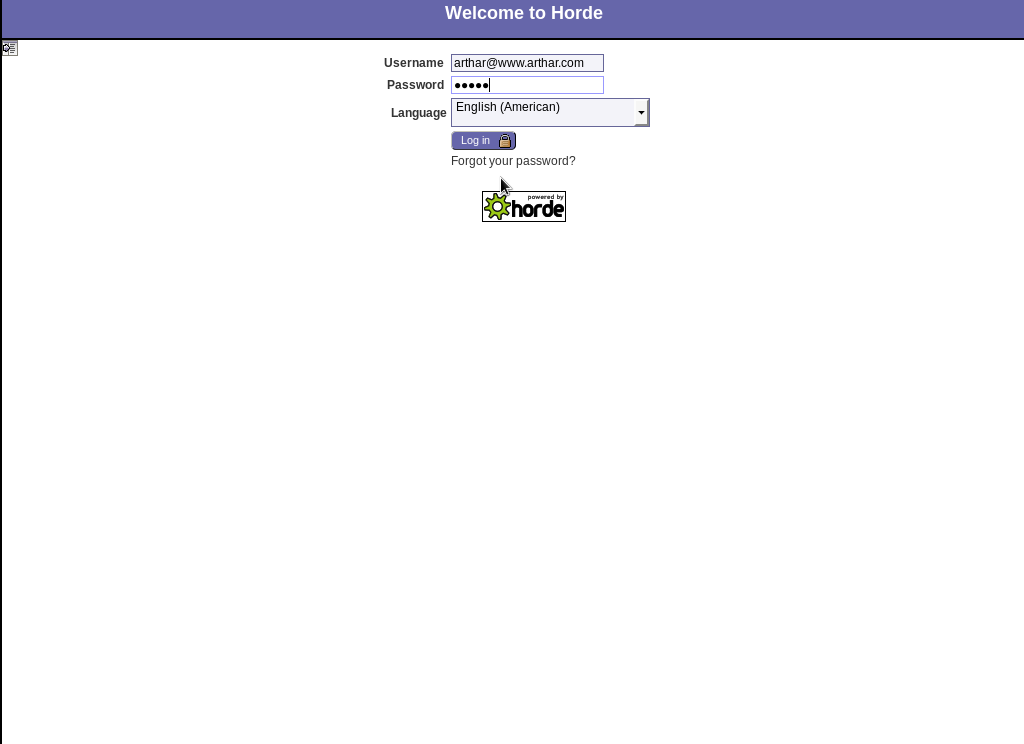
Open your browser and go to https://192.168.31.200/ and log in with the details above, you can the create other users under administration → users. You can test all the other features as well.






Nice Written but getting problems with :
1.) Applied mail attachment size for the users not working through horde as well as no alert received on users quota exceeded ???
2.) How to connect users Or bypass their authentication through Exchange AD. Please share steps.
3.) Steps to make backup of incoming/outgoing mails with their attachments.
I would definitely not recommend these as ways to
break the ice however. If I knew how to bake cookies, I would do
that and send over a care package but Im much better at telling jokes so I go there and entertain, shake hands and thank the men and women who serve our country.
He represented his homeland in four Olympics and is a three-time indoor
world champ in the 1500 meters.